
Test the agent by voice. Before a customer ever hears it.
Simulated callers speak to your agent over real audio. Different personas, moods and edge cases, run as a batch before every release. You test how the speech model actually behaves on a call, not how a prompt reads in text. That cuts the time from pilot to go-live.
Four steps, repeated every release.
The loop is short enough to run on every change, so regressions show up in a batch instead of on a customer call.
Define personas and scenarios
One target agent, up to 64 counterpart callers. Each persona sets who they are and what they want: an angry customer, a confused one, someone off topic.
Run voice-to-voice calls in batch
Every persona calls the agent at the same time. Audio flows both ways. The speech model hears interruptions and pauses exactly as it would from a person.
Score outcomes
Each call ends with a verdict: goal met or not, errors noticed, a short summary. Pass, review and fail counts roll up per batch.
Fix and rerun
Open any failed call in Lens, see the exact turn that went wrong, fix the agent, run the same batch again.
What the team sees. Real screens from a live demo build.
Example below: an insurance needs-discovery agent tested against regional caller personas. Hover or tap a number.
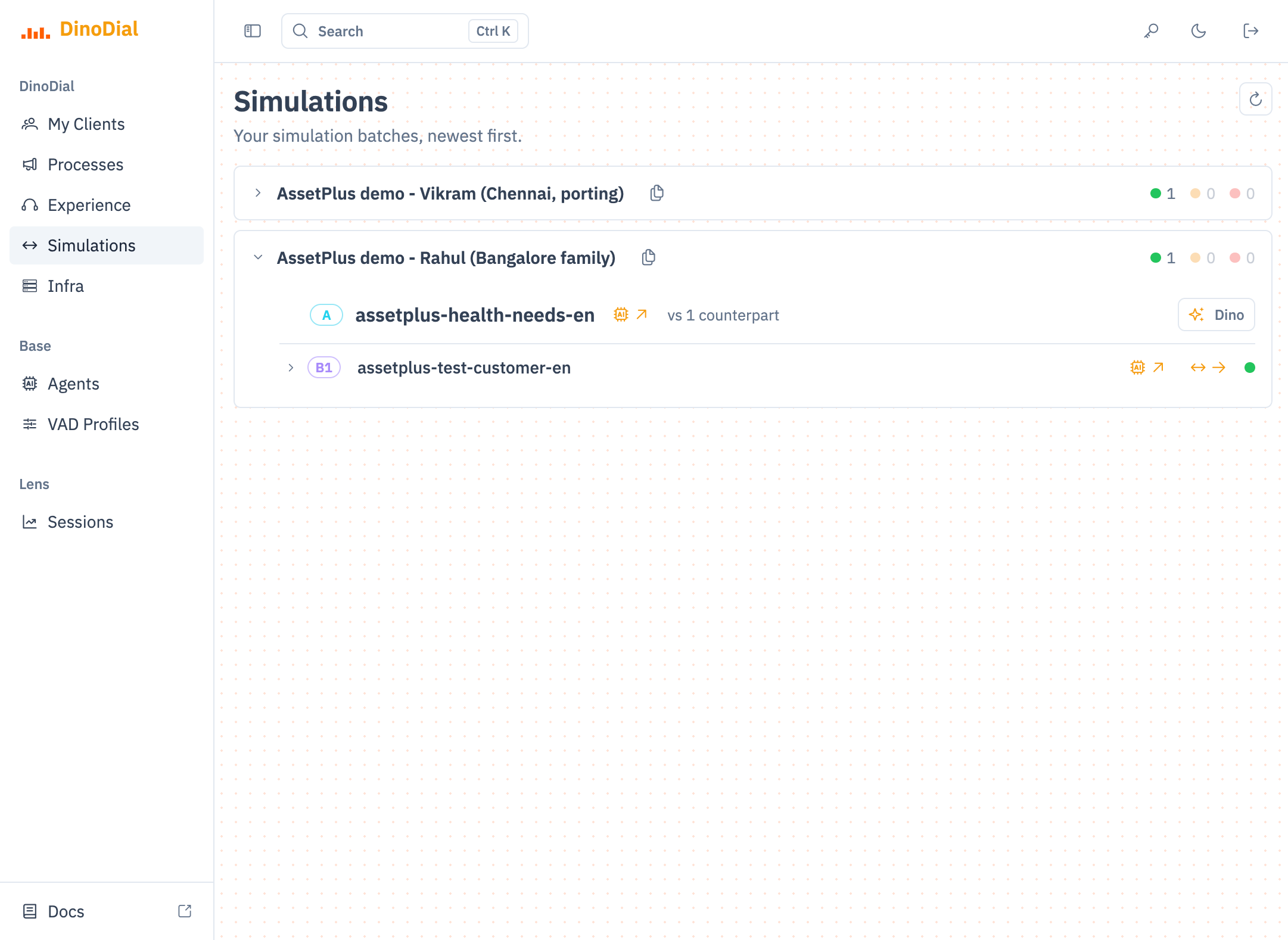
Every batch, with its score.
One row per batch, newest first. Expand it to see who was tested against whom.
- 1Named persona. "Vikram, Chennai, porting a policy." Each batch describes a real caller type, with region and intent.
- 2Pass, review, fail counts. Green, amber and red totals per batch. Readable at a glance before a release.
- 3Target (A). The production agent under test, exactly as it will be deployed.
- 4Counterpart (B1). The simulated caller. A batch can hold up to 64 of these, each one different.
- 5Open the call. One click into the full simulated conversation in Lens.
- 6Per-call result. Status for this single persona run.
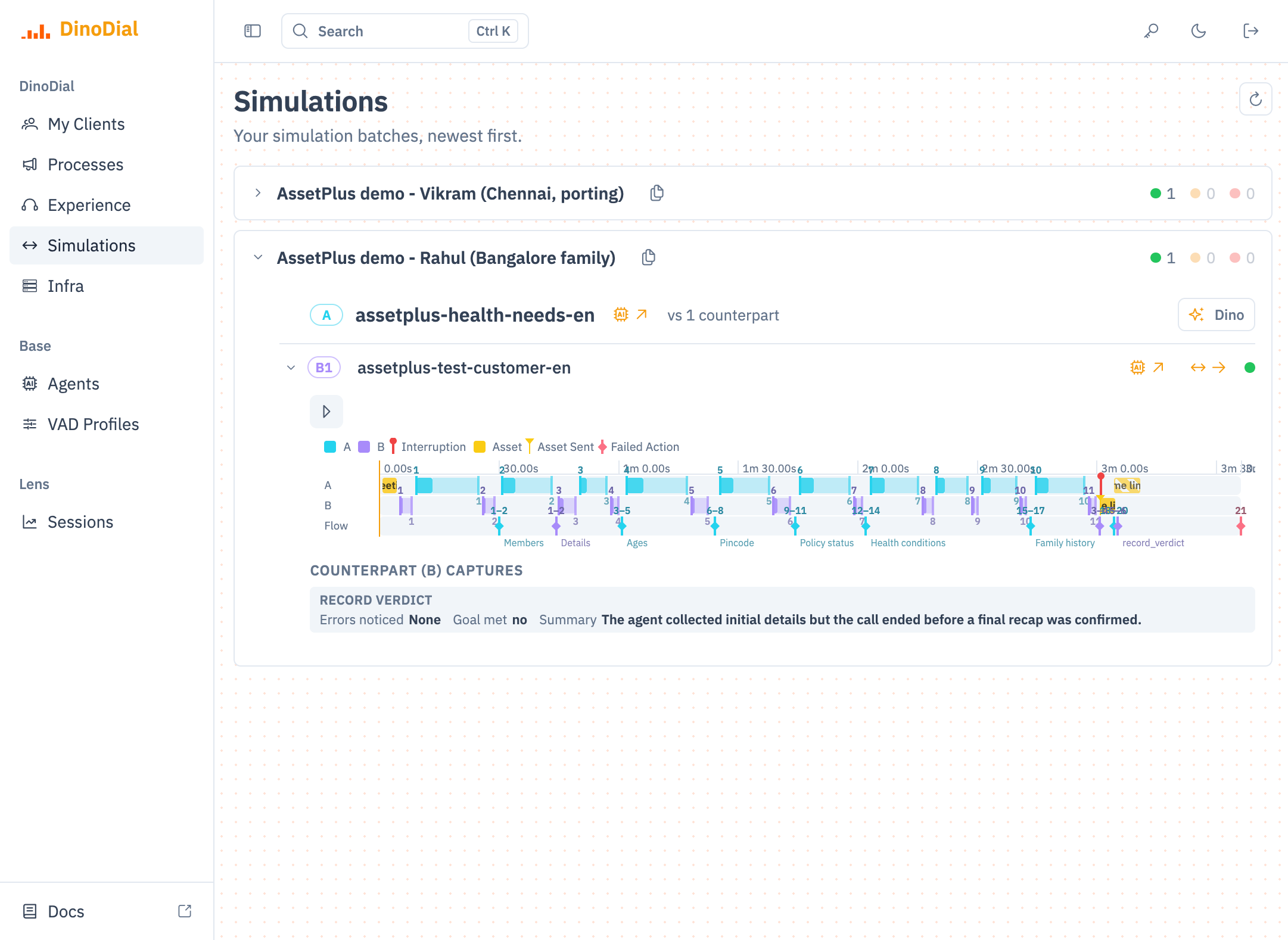
Hear it, then read the verdict.
The batch view already shows the whole call. No need to open logs to know what happened.
- 1Play the call. The actual audio between agent and simulated caller. You hear what a customer would hear.
- 2One shared timeline. Agent (A) and caller (B) speech on the same clock, turn by turn.
- 3Interruption marker. Where the caller cut in, and how the agent handled it.
- 4Flow stages reached. Members, Details, Ages, Pincode, Policy status, Health conditions, Family history. You see how far the script got.
- 5Record verdict. The simulated caller scores the call: errors noticed and a one-line summary.
- 6Goal met: no. The call completed but the goal did not. "Call ended before a final recap was confirmed." That is a fix to make before go-live.
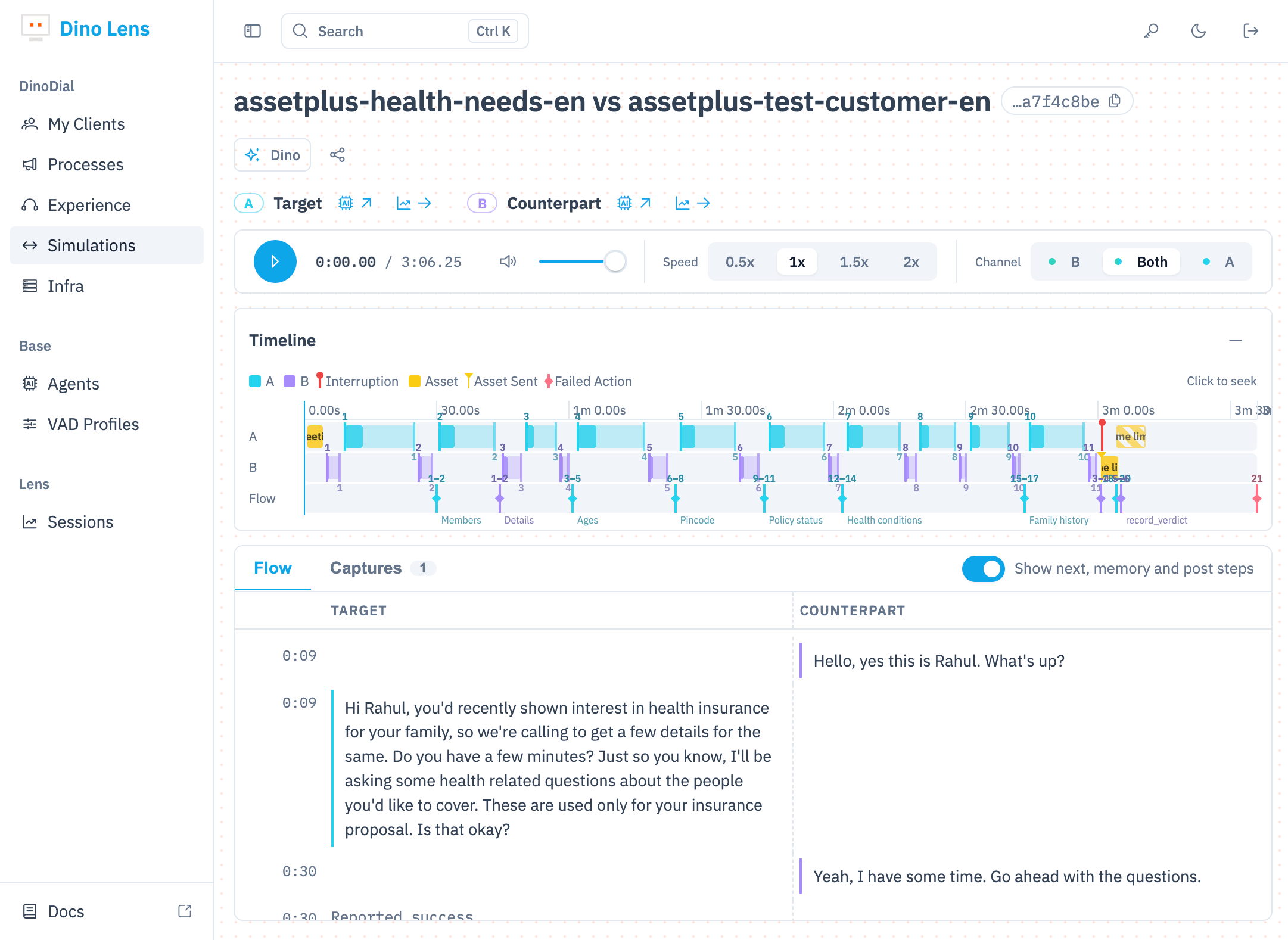
Same Lens view as production.
A failed simulation opens in the exact screen used for live calls. One tool for testing and for monitoring.
- 1Agent vs persona. Which agent was tested against which caller, with a run id to share.
- 2Target and Counterpart. Jump to either agent's config, or to each side's own Lens report.
- 3Channel A, B or Both. Listen to each side alone to catch talk-over and dead air.
- 4Event legend. Interruptions and assets sent, plotted on the call.
- 5Flow and Captures. Each stage the agent moved through, and the data it captured.
- 6Side-by-side transcript. Agent on the left, simulated caller on the right, timestamped.
From a few manual test calls to a batch on every release.
Text tests check the prompt. Only a spoken call checks the speech model: turn taking, interruptions, silence, pacing.
Manual QA calls
- CoverageA few people dial in and try what they remember to try.
- RealismOften text chat or scripted reads. Speech model timing goes untested.
- RepeatHard to replay the same caller after a fix.
- EvidenceNotes and memory. Hard to show what broke.
- ReleaseRegressions surface on real customer calls.
Automated voice batches
- CoverageUp to 64 personas per batch, run in parallel: moods, regions, edge cases.
- RealismReal audio both ways. The model's own turn detection, real tools and real endings.
- RepeatOne batch file. Rerun the exact same personas after every change.
- EvidenceVerdict per call, plus a full Lens report with audio, timeline and transcript.
- ReleasePass, review, fail counts before anything ships.
Runs from the dashboard, the API, the Dino CLI or MCP. Results can be pushed to a callback URL.
Simulation feeds the rest of the harness.
Every simulated call lands in Lens
Same timeline, transcripts, interruptions and outcomes as a production call.
Open Lens → Pillar 5 · CLI and MCPRun batches from a coding agent
One command runs a batch file. Coding agents read the results and suggest the fix.
Open CLI and MCP →